One Line in <head> Was Breaking Every Page Transition
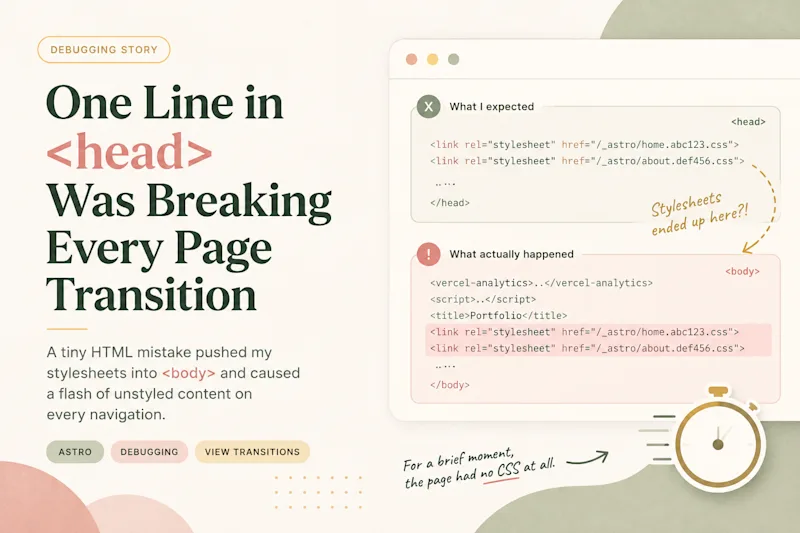
Ever since I built my portfolio site, there was one tiny issue that kept bothering me.
Every page transition briefly showed unstyled HTML before the fade animation kicked in. It only lasted a fraction of a second, and most visitors probably would never notice it.
I noticed it every single time.
At first, I convinced myself it wasn't worth spending hours on such a minor visual glitch. But the longer I left it unfixed, the more it bothered me. My portfolio is supposed to reflect how I approach engineering. Shipping a site with a visible flash of unstyled content felt like it contradicted that principle.
So yesterday I finally decided to stop ignoring it and find the root cause.
Today, the issue is gone.
Ironically, the actual fix only involved moving one component from <head> to <body>.
Getting there, however, took much longer.
The setup
The site is built with Astro and uses <ClientRouter /> for View Transitions. Most of the UI is built with my own Lit web components, and I use a custom page transition where the current page fades into the background before the next page fades in.
When I first started debugging, I had several theories.
First guess: my web components weren't ready yet
My first suspicion was my own component library.
Astro renders custom elements on the server, but they aren't fully upgraded until their JavaScript runs. Before that, the browser simply renders their light DOM.
I already had this guard:
:where(ark-button, ark-chip, ark-hero /* ... */):not(:defined) {
  visibility: hidden;
}
Then I remembered something about Lit.
:defined only means the custom element constructor has been registered. Lit still performs its first render asynchronously, so there's a tiny window where an element is technically defined but hasn't rendered its shadow DOM yet.
That sounded like exactly what I was seeing.
I changed my page loader to wait for every component to be defined before removing itself.
It didn't fix the flash.
Instead, I created another problem.
On preview deployments the loader never disappeared because I accidentally waited for Vercel's own <vercel-live-feedback> element, which never became ready in the way I expected. After restricting the check to only my ark-* components and adding a timeout, the loading screen behaved correctly again.
The original flash was still there.
Then I blamed the transition
The next thing I looked at was the View Transition itself.
Recording the transition frame by frame actually revealed two unrelated issues.
The first involved shared element transitions. I had extended the image morph animation to match my 500 ms page fade. Under CPU throttling it looked terrible because the morphing image wasn't clipped while it animated. Going back to the browser's default duration immediately made it look much better.
The second issue happened when navigating from the middle of a page.
Astro captures the outgoing page exactly where the user currently is, then scrolls the incoming page back to the top. During the crossfade, both scroll positions overlap, producing an obvious ghosting effect.
Scrolling back to the top during astro:after-preparation fixed that nicely.
Both changes improved the experience.
Neither fixed the flash.
Maybe it was the fonts?
The flash always showed a default serif font, so naturally I started looking into font loading.
I found an Astro issue discussing how inline @font-face styles could disappear temporarily during ClientRouter's head swapping.
It looked almost identical to my problem.
The issue had already been fixed in the Astro version I was using, but I still tried the suggested workaround by explicitly persisting those <style> tags.
I even verified they were no longer removed during navigation.
The flash still happened.
I became convinced it was stylesheet swapping
Reading Astro's swapHeadElements() implementation, I noticed that it removes the old page's unique <head> elements before adding the new ones.
That sounded dangerous.
My homepage and About page loaded different CSS bundles. If Astro removed one bundle before adding the next, maybe there was a brief moment where neither stylesheet existed.
That theory felt convincing enough that I reorganized my project so every page shared exactly the same CSS bundle.
It worked exactly as intended.
The flash was still there.
At this point I had spent hours implementing solutions to problems I was no longer sure existed.
Comparing environments
| Environment | Flash? |
|---|---|
astro dev, desktop |
No |
astro dev, mobile over LAN |
No |
| Vercel Preview | Yes |
| Vercel Production | Yes |
Local server serving vercel build output |
Yes |
This comparison ended up being the biggest clue.
The problem wasn't my browser.
It wasn't my phone.
It wasn't Vercel.
The difference was simply development mode versus the production build.
And the slower the network, the easier it became to reproduce.
That immediately made me think about CSS.
During development, Vite injects CSS as inline <style> tags.
In production, CSS becomes external stylesheet files.
So I stopped asking when styles were loading.
Instead, I asked where they were.
document.head.querySelectorAll('link[rel=stylesheet]').length
// 0
Zero.
That couldn't be right.
Then I checked the body.
[...document.body.children].slice(0, 8).map(e => e.tagName)

// ['VERCEL-ANALYTICS', 'SCRIPT', 'META', 'META', 'SCRIPT', 'TITLE', 'LINK', 'LINK']
There they were.
My stylesheet links.
Inside <body>.
Along with my <title>.
The real cause
My layout looked like this:
<Font cssVariable="--font-sans" preload />
<Analytics />
<ClientRouter />
<title>{title}</title>
<Analytics /> from @vercel/analytics/astro renders a <vercel-analytics> custom element.
Custom elements aren't valid inside <head>.
When the browser encountered <vercel-analytics>, it silently closed the <head> tag and started parsing everything else inside <body>.
That meant my stylesheet links, title, and ClientRouter script were never actually inside <head>.
This caused two separate issues.
First, Astro's preloadStyleLinks() only looks for stylesheet links inside <head>, so it never preloaded anything.
Second, every page navigation replaced the entire <body>, destroying the already loaded stylesheet links and inserting brand new ones that still had to be downloaded.
For a brief moment, the page had no CSS at all.
That's exactly what I had been seeing since the very beginning.
The fix was almost embarrassingly simple.
<body>
  <Analytics />
  ...
</body>
After moving Analytics into <body>, the stylesheet links stayed inside <head>, Astro could preload them correctly, and the flash disappeared completely.
I tested the worst case I could think of by throttling the network, navigating between pages with different CSS bundles, and stepping through every animation frame.
Not a single unstyled frame remained.
Cleaning up
Once I understood the real issue, most of my earlier changes became unnecessary.
I removed the whenDefined() gate.
I removed the font persistence workaround.
I restored proper CSS code splitting instead of forcing every page to load the same stylesheet.
The only fixes I kept were the ones that solved separate problems: scrolling to the top before the View Transition snapshot, and disabling Android's blue tap highlight.
What I learned
The biggest lesson wasn't anything specific to Astro.
It was about debugging.
I spent hours building theories that sounded perfectly reasonable. Each one had a convincing explanation. Some even uncovered real improvements that I decided to keep.
But none of them explained the original bug.
The breakthrough happened when I stopped reasoning about what I thought the browser was doing and started inspecting what it had actually parsed.
If I had run this on the first day:
document.head.querySelectorAll('link[rel="stylesheet"]')I probably would have found the problem in minutes instead of hours.
Sometimes the browser already knows the answer.
You just have to ask it.